かず・ごっこ遊び
お買い物で「10」をつくろう
りんごをかごに入れて、にんじんもひとつ。値札を見ながら「ぜんぶでいくつ?」を考える、Little Play Gardenのお買い物遊びです。答えを急がず、絵・数・コインを行ったり来たりできるようにしています。
まずは、1と2を合わせるお買い物
- にこにこ おかいものを開き、「もりの やおや」「2こで 10まで」を選びます。途中から始まったときは「この おかいものを やりなおす」で最初の問題に戻せます。手帳の記録は残ります。
- お買い物メモのりんごとにんじんを、売り場からかごへ運びます。ドラッグが難しければ商品をタッチするだけでも入ります。間違えた商品はかごの絵をタッチして戻せます。
- 「レジへ」から、商品をひとつずつレジに運ぶかタッチして読み取ります。全部読み取るまで次のステップには進みません。
- 最初の問題では1と2が並びます。「いっしょに かぞえる」を押すたびに丸がひとつずつ強調されるので、1、2、3と数えてから答えを選びます。
- 答えが合ったら支払いへ。「どうぞ!」で買い物が終わり、レシートが残ります。間違った答えでも、その場で数え直せます。
慣れたら「ぴったり 10」へ
この設定では、指定の商品をそろえる代わりに、自分で2こ以上の商品を選んで合計10をつくります。同じ商品をふたつ買っても構いません。値段は問題ごとに変わる練習用の数字です。お店を変えても同じ問題の数字は引き継がれるので、パンやピクニックの品物でも試せます。
まず値札を見て「あと いくつ? ヒント」を押し、今の合計と10までの空きを見ます。たとえば合計3なら、残りは7。「7の品物をひとつ」だけでなく、「2と5を足す」という選び方も考えられます。その値段の商品があるか、売り場で確かめてください。
合計10の買い物が終わると、数字の組み合わせが手帳に残ります。順番を変えただけの組み合わせは重複して増えません。「この前とは違う10を作れるかな?」と振り返れます。全部集めることを急がず、気に入った組み合わせを何度試しても大丈夫です。
支払い方を変えるなら
最初は足し算のあと、まとまったコインを渡す設定がおすすめです。保護者向けの支払い設定で1・5・10コインに変えると、コインを選んでトレーに入れられます。合計7なら5と1と1。必要な額を超えるコインは入りません。「コインを もどす」で最初から数え直せます。ここではおつりの計算や実際の通貨は扱いません。
困ったときは、操作と数を分けて
- レジへ進めない:「2こで 10まで」と「20まで」は、合計だけでなくメモと同じ品物が必要です。「ぴったり 10」は2こ以上・合計10が条件です。
- ドラッグしにくい:商品をタッチしてください。スマートフォンでは下にかごが出ます。指を離す場所はかごの中の品物エリアです。
- 数え飛ばしてしまう:丸をひとつずつ強調するボタンを使います。全部数えるともう一度数え直せます。
- 記録を消したい:問題のやり直しと手帳のリセットは別です。手帳内の「おとなと きろくの せってい」から消す内容を確認してください。
画面で確かめる:かごの中と、レジの「1 / 2」
手順1:値段の前に、メモと同じ品物かを見る
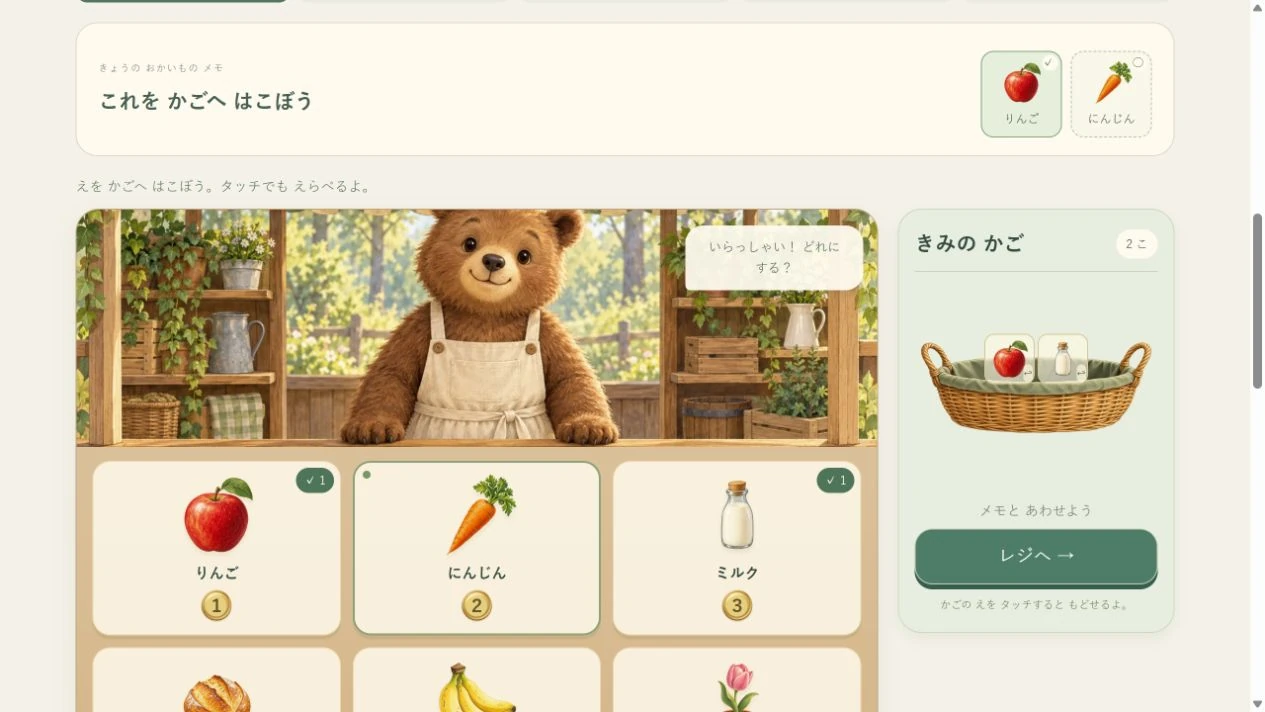
画像は「もりの やおや」「2こで 10まで」の最初の問題です。メモはりんごとにんじんですが、かごにはりんごとミルクが入っています。2こ入れただけでは「レジへ」は押せません。メモでチェックのないにんじんを指し、「かごのどれを入れ替えよう?」と一緒に見ます。
- かごのミルクの絵を押して、売り場へ戻します。
- 売り場のにんじんを押すか、かごへドラッグします。
- メモの2つにチェックがつき、「レジへ」が押せる状態になったかを確かめます。
手順2:レジの数字は「読み取った品数」
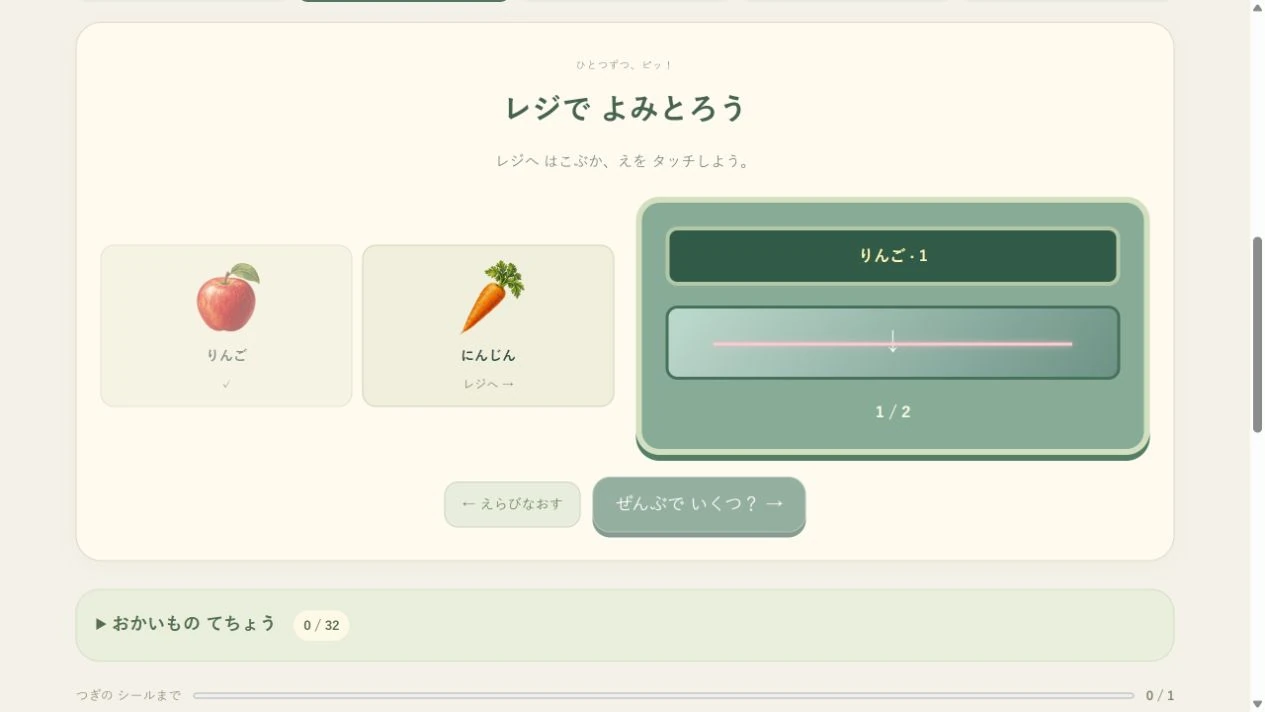
「レジへ」を押したあと、画像ではりんごだけを読み取っています。「1 / 2」は値段ではなく、2このうち1こを読み取った印です。チェック済みのりんごではなく、まだチェックのないにんじんの絵を押すか、レジのガラスのところへ運びます。「2 / 2」になると「ぜんぶで いくつ?」へ進めます。
同じ商品を2こ買ったときも、レジではそれぞれの絵を1こずつ読み取ります。「数が分からない」のか「まだレジが終わっていない」のかを、チェックと品数で分けて見られます。
画面を離れて、小さなお店を続けよう
紙に1、2、3などの値札を書き、家にあるおもちゃを3つ並べます。紙の丸を10こ用意してコインに見立て、おとなが店主、子どもがお客さんになってみましょう。最初は品物ふたつだけ。遊びが続きそうなら役割を交代し、「いくらですか」「どうぞ」「ありがとう」のやりとりも楽しめます。
画面で正解した式をもう一度使っても、別の値札で考え直しても構いません。実物では数を並べ替えられるので、2と3、3と2のどちらも5になることを一緒に確かめられます。
これは当サイトの遊び方の提案です。特定の年齢でできることや学習効果を保証するものではありません。難しければ、数を減らす・保護者が一部を操作する・別の遊びに移る、のどれでも大丈夫です。
NUMBERS & PRETEND PLAY
Make 10 in the little market
Put an apple in the basket, then add a carrot. Happy Little Market lets you connect pictures, price labels and coins without rushing to an answer. This guide walks through one trip, then offers ways to explore a total of 10 together.
Begin by adding 1 and 2
- Open Happy Little Market. Choose Woodland groceries and “Two items · up to 10”. If an old trip loads, restart the trip to return to the first problem. Your notebook stays.
- Match the apple and carrot on the picture list. Drag each into the basket, or simply tap it. Tap a basket item to put it back.
- Go to the till. Carry each item to the scanner or tap its picture. Every item needs a scan before you can continue.
- The first problem shows 1 and 2. Press “Count together” to highlight one dot at a time. Count 1, 2, 3, then choose the total.
- After the correct answer, give the coins to finish. A receipt records the trip. A wrong answer stays on the same question so you can count again.
Explore “Make exactly 10”
Now choose your own two or more items rather than following a fixed list. You can buy the same item twice. Prices are practice numbers that change between problems. Switching shops keeps the current problem's numbers, so you can also explore with bakery or picnic goods.
Use “How many more? Hint” to see your total and the spaces left to reach 10. A basket totalling 3 needs 7 more. Look for an item priced 7, or try adding a 2 and a 5 if those prices are on the shelf. Check the current labels before choosing.
Completed totals of 10 go into the notebook as number combinations. Changing only the order does not create a new combination. Ask “Could we make a different 10?” or revisit a favourite. There is no need to collect them all.
Choose how to pay
Begin with coins prepared after the addition question. In the grown-ups' payment settings, switch to 1, 5 and 10 coins when you want another counting activity. For a total of 7, try 5, 1 and 1. A coin that would exceed the amount is rejected; “Return coins” lets you start again. The game does not calculate change or use real currency.
Separate controls from counting
- Cannot go to the till? The two-item and up-to-20 modes need the pictured goods, not just a matching total. Exactly-10 mode needs at least two items and a total of 10.
- Dragging is awkward? Tap the item instead. On phones, the basket stays at the bottom. The drop target is the item area inside it.
- Skipping a dot? Use Count together. Once all dots are counted, you can begin again.
- Want to clear records? Restarting a trip keeps the notebook. Its separate grown-ups' settings explain what resetting records removes.
Read the basket and scanner screens
Step 1: match the goods before adding prices
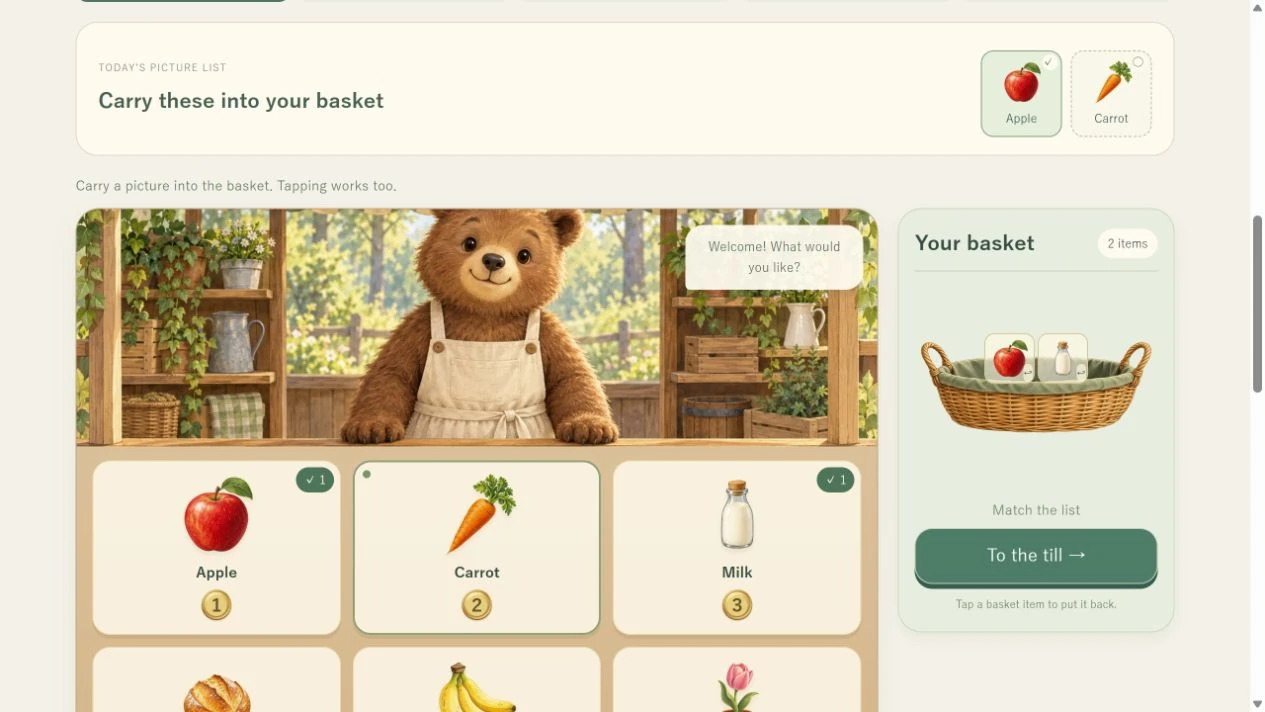
This example is the first Woodland groceries trip with “Two items · up to 10”. The picture list asks for an apple and a carrot, but the basket contains an apple and milk. Two items alone do not enable “To the till”. Point to the unchecked carrot and ask, “Which item in our basket could we swap?”
- Tap the milk picture inside the basket to put it back.
- Tap the carrot on the shelf, or drag it into the basket.
- Check that both list pictures have ticks and “To the till” is available.
Step 2: the scanner counts items, not prices
After “To the till”, this picture shows only the apple scanned. “1 / 2” means one of two items has been read; it is not a price. Choose the carrot without a tick, rather than the apple already checked. Tap its picture or carry it to the scanner glass. When the display reaches “2 / 2”, “Add them up” becomes available.
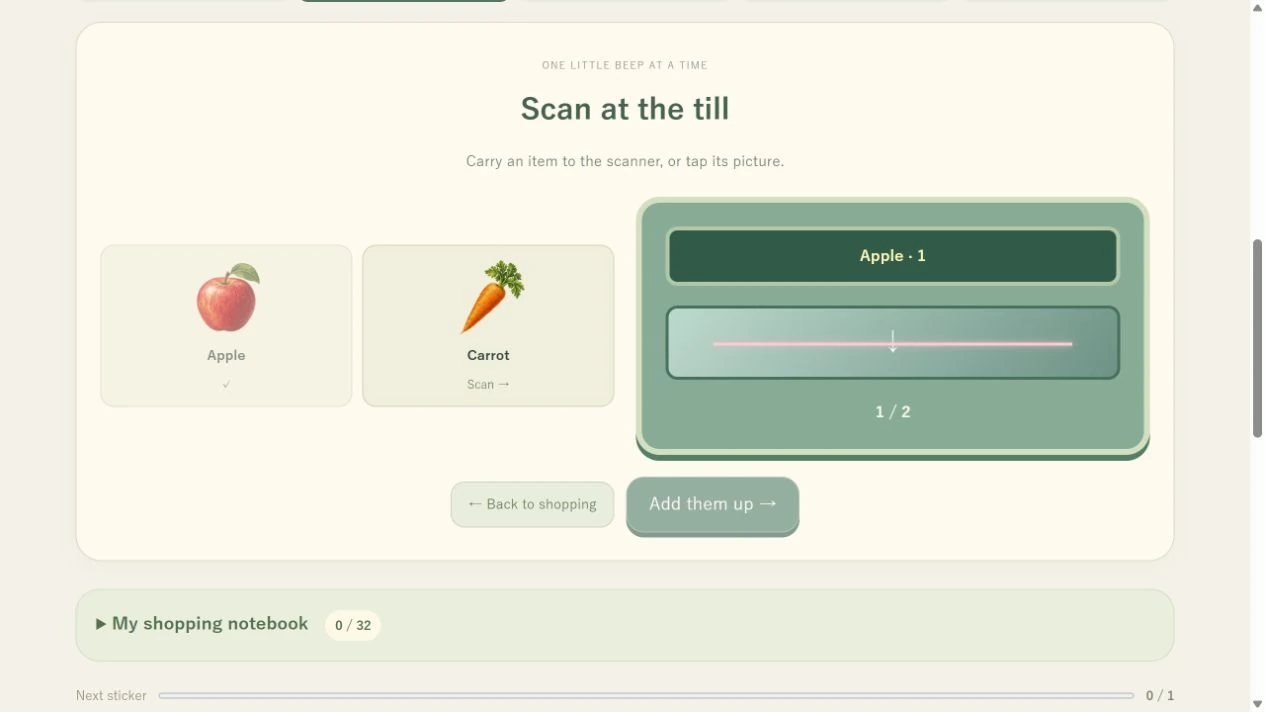
If you buy two of the same product, scan each picture separately. The ticks and item count help distinguish an unfinished scan from a counting question.
Continue with a small pretend shop
Write simple price labels on paper and place three toys beside them. Make 10 paper circles for coins. Take turns being the shopkeeper and customer. Begin with two goods and try “How much?”, “Here you go” and “Thank you”.
Reuse a sum from the game or change the labels. With movable circles you can compare 2 plus 3 with 3 plus 2 and check that both make 5.
These are play suggestions, not promises about learning outcomes or what a child should do at a particular age. Reduce the numbers, share the controls or choose another activity whenever that feels better.