はじめて・親子であそぶ
はじめての親子ゲーム、どう手伝う?
ゲームを選んだのに、どこを押すか分からない。おとなが手伝ううちに、いつの間にか全部操作してしまう。そんなときに、最初のひと遊びを小さく分けるための案内です。年齢別の到達目標ではなく、今楽しめる操作から選びます。
最初は「ひとつ見せて、ひとつ任せる」
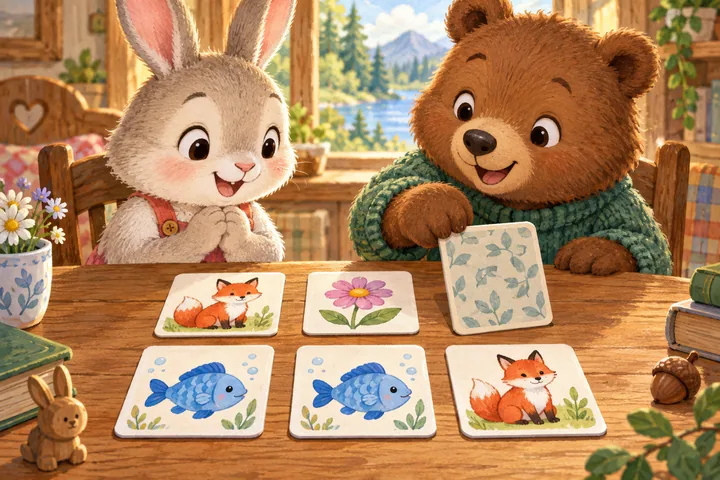
保護者が一度だけ操作を見せ、次の同じ操作を子どもに任せます。たとえば絵合わせならカードを1枚めくって見せ、次の1枚を選んでもらいます。ドラッグなら運ぶ先を指で示し、どの品物を運ぶかは子どもが決めます。説明を全部読み上げるより、今行うことをひとつ伝えてみてください。
今日やりたいことから、入口を選ぶ
見る・見つける
どうぶつの えあわせは6枚から始められます。絵を見せるヒントを使い、同じなかまの位置を一緒に探しましょう。えほんの まちがいさがしなら3個の違いから。画面全体ではなく、窓やテーブルなど一か所ずつ見比べられます。
運ぶ・つくる
かたちの アトリエは影合わせや少ないピースから。ドラッグだけでなく、ピースを押して置き場所を押す操作もできます。にこにこ おかいものは絵のメモと売り場を照らし合わせ、品物ふたつから遊べます。
鳴らす・まねする
どうぶつ おんがくひろばで音を試してから、ひとつの鍵盤を押してみます。まず自由に鳴らし、まねっこは後からでも構いません。もりの リズムたいでは音と一緒に光る場所も手がかりにできます。
交代は、答えより操作で区切る
絵合わせで「カードを2枚めくったら交代」、買い物で「商品を選ぶ人とレジを通す人を交代」など、見える動作を区切りにします。おとなの番も考えているところを言葉にすると、完成した答えだけでなく探し方を共有できます。「ここにねこがいた気がする。確かめてみよう」と話してから選ぶような形です。
難しさは、ひとつずつ変える
カード枚数、ピース数、足し算の上限などを一度に全部増やさず、ひとつだけ変えてみます。数はそのままでヒントを減らす、操作は保護者が担当して選択を子どもに任せる、という調整もできます。前回できた設定でも、今日はやさしくしたいことがあります。
手助けを減らすことを必ず目標にする必要はありません。一緒に探すのが楽しいなら、その遊び方を続けられます。うまくいかなかった回をやり直しても、次の絵を選んでも構いません。
終わり方を先にひとつ決める
「この料理ができたら」「この買い物が終わったら」など、分かりやすい場面を区切りにします。途中で終えたくなったら、保存に対応したゲームでは続きが残ることがあります。残る範囲はゲームで違うため、下の遊び方や保存表示を確認してください。無理に最後まで続けなくて大丈夫です。
音・操作・記録で困ったら
- 音が出ない:ゲームの音ボタンや「おとを ためす」を押し、端末・ブラウザのミュートと音量を確認します。文字の読み上げは利用できない端末があります。
- ドラッグが難しい:対応ゲームではタッチやクリックの代替操作を使います。指で見本を指し示し、保護者が移動を担当しても構いません。
- 英語に変えたい:上のEnglishタブを使います。日本語と英語は同じサイトで切り替えられます。
- 前の記録がない:同じ端末でも、別のブラウザやプライベートモードでは記録が違う場合があります。サイトデータ削除や図鑑のリセットでも消えます。端末間の同期はありません。
不具合が続く場合は、お問い合わせでゲーム名、使ったブラウザ、押したボタン、画面の状況を教えてください。子どもの名前や写真は不要です。
FIRST VISIT & SHARED PLAY
Playing together: help without taking over
Sometimes a child does not know where to tap. Sometimes a grown-up starts helping and ends up doing everything. This guide breaks a first shared game into small actions. Choose what feels enjoyable now rather than using age as a target.
Show one action, then offer one turn
Demonstrate once and let your child try the next similar action. In a matching game, turn one card and let them choose the next. For dragging, point to the destination while letting them choose the item. Explain the next step, rather than every instruction at once.
Choose by what you want to do today
Look and find
Little Picture Pairs starts with six cards and offers a peek hint. Look for a partner together. In Picture Book Puzzles, begin with three differences and compare one area, such as a window or table, at a time.
Carry and build
Shape Studio offers shadow matching and small puzzles. Tap a piece and its destination if dragging is awkward. Happy Little Market begins with two pictured goods to carry from the shelf to the basket.
Care and watch a change
Try one care action in Puku's Little Home and look for changes in the meters or appearance. In Little Harvest Garden, plant one plot and follow its tool prompts through to harvest.
Make and copy a sound
Test the sound in Animal Music Garden, then try one key. Play freely before copying a tune. Forest Rhythm Band also lights up the drum being played.
Take turns around an action
Use a visible boundary: turn two cards, or alternate choosing groceries and scanning them. During your own turn, say what you are thinking: “I think the cat was here. Let's check.” That shares a way to search, rather than just the answer.
Change one challenge at a time
Increase the card count, puzzle size or addition range one at a time. You can keep the same count and reduce hints, or handle movement while your child makes the choices. An easier setting can feel better today even if a harder one worked yesterday.
Less help is not always the goal. Keep searching together if that is what you both enjoy. Repeat a round or choose another picture when you want to.
Choose a simple stopping point
Try “After this dish” or “After this shopping trip”. If you stop earlier, some games save progress, but what is saved differs by game. Check its guide and save display. You do not have to finish.
Help with sound, controls and records
- No sound? Press the game's sound control or sound test, then check device and browser volume or mute. Speech is not available on every device.
- Dragging is awkward? Use tap or click alternatives where offered. Your child can point to a choice while you move it.
- Changing language? Use Japanese or English at the top. Both languages belong to this same site.
- Missing progress? Another browser or private browsing can have different records. Clearing site data or resetting a collection removes records. There is no sync between devices.
If a problem persists, contact us with the game, browser, button and what appeared on screen. Your child's name or photo is not needed.