かんがえる
同じ絵を見つける、左右の違いに気づく、ピースをつなげる。似た「絵を見る」遊びでも、使う手がかりは違います。ここでは当サイトの3ゲームを、最初の操作から分けて紹介します。
絵合わせ:外れた場所を、次の手がかりに
どうぶつの えあわせで「カードの まいすう」で6枚を選び、「もりの なかま」「うみの なかま」「おみせの しなもの」から好きな絵柄を選びます。ヒントの表示は、自分で隠すまで・8秒・3秒から調整できます。最初は自分で隠す設定にして、同じ絵を一緒に確認してからカードを戻しても構いません。
- カードを2枚めくり、絵が同じか確かめます。
- 違ったら、そのうちひとつだけ場所を覚えます。「パンは右の下にいたね」と、位置と絵をつなげましょう。
- 次のカードにパンが出たら、覚えた場所を探します。覚えていなくても、もう一度確かめられます。
外れた絵を急いで隠したくないときは、保護者向け設定で自動で戻す設定を使わず、「つぎの2まい」へ進む操作を使います。親子交代なら2枚めくる単位で番が変わります。枚数を増やす前に、同じ6枚で別の絵柄を試しても楽しめます。
同じ絵柄でも、枚数を変えて小さな目標に
「おでかけの てちょう」には、3つの絵柄それぞれに6・8・12枚のコースがあり、全部で9コースです。ひとつのコースで全部のペアを見つけると、スタンプが1つ残ります。同じコースを何度遊んでもスタンプは増えないので、クリア済みの印を見て次の遊びを選べます。以前のクリア回数からスタンプが付く仕組みではありません。
たとえば、まず「もりの なかま」を6枚で遊び、次に「うみの なかま」、その次は「おみせの しなもの」を同じ6枚で遊びます。この3コースをクリアすると3スタンプになり、カード裏の「うみ」が選べます。最初は「はっぱ」、6スタンプで「いちご」、9スタンプで「きんいろ」も選べます。裏のデザインは、選ぶと今のラウンドにも反映されます。枚数を増やす前に、好きな絵柄で遊び直しても構いません。
図鑑の絵を、大きく見てみよう
「なかまの えほんずかん」で、すでに見つけた絵を押すと大きく見られます。「うさぎの耳はどんな形?」「パンとりんご、どこが違う?」と、カードの場所を覚える遊びから絵そのものを見る遊びへ切り替えられます。まだ見つけていない絵は、ペアを探してから観察できます。見終わったら「あそびに もどる」で閉じます。
画面で確かめる:2枚を戻すときと、記録を残すとき
手順1:違う2枚は、見終わってから戻す
画像は、森の6枚で違う絵を2枚めくり、「おすまで みせる」の設定で止めている場面です。「この絵はここだね」とどちらか1枚の場所を指してから、「つぎの 2まいへ」を押します。これは今見えている2枚を伏せる操作で、カードの配置を並べ替える操作ではありません。
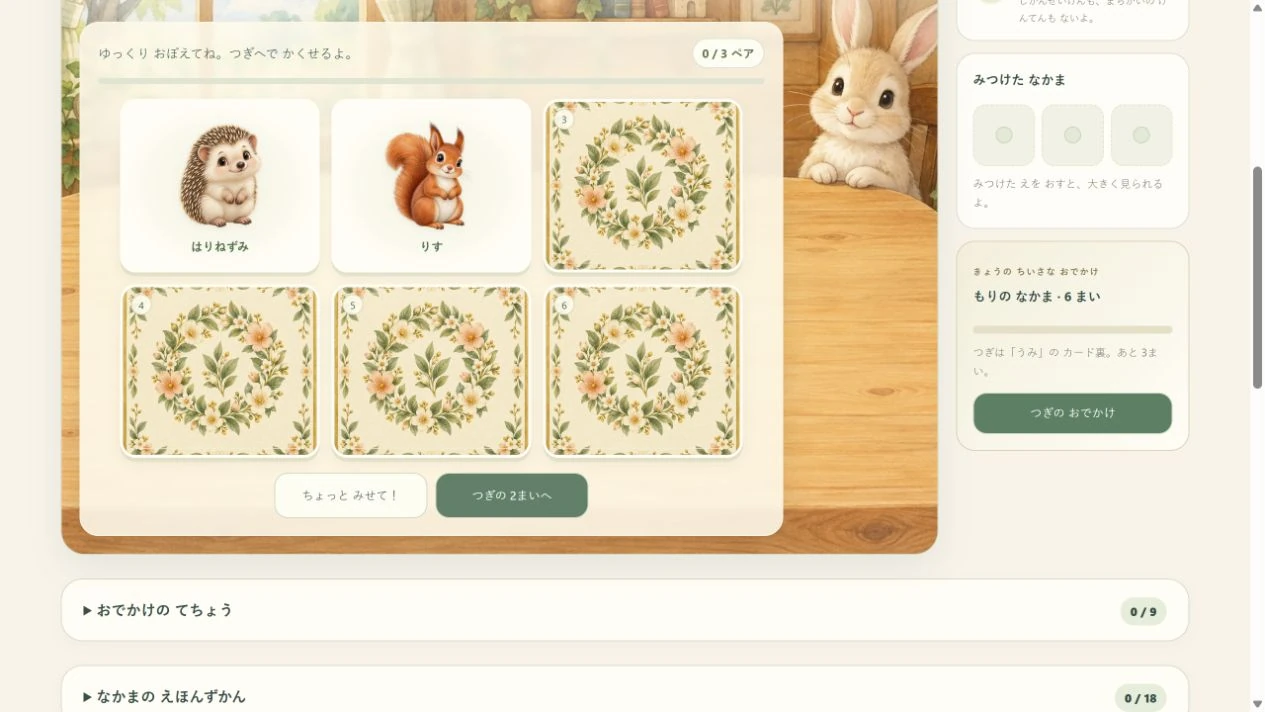
保護者向け設定の「ちがう ペアを みる ながさ」が「おすまで みせる」なら、急いで覚える必要はありません。見終わるまでそのまま待てます。新しいラウンドへ移る「はじめから」は押さず、同じ配置でもう一度探してみましょう。
手順2:手帳の確認文で、残る記録を読む
画像は「おでかけの てちょう」を開き、「コースとカード裏を リセット」の確認を出したところです。9つのコースのスタンプと、見つけた絵を集める図鑑は別の記録。確認文には、図鑑の絵と全部そろえた回数が残ることが書かれています。
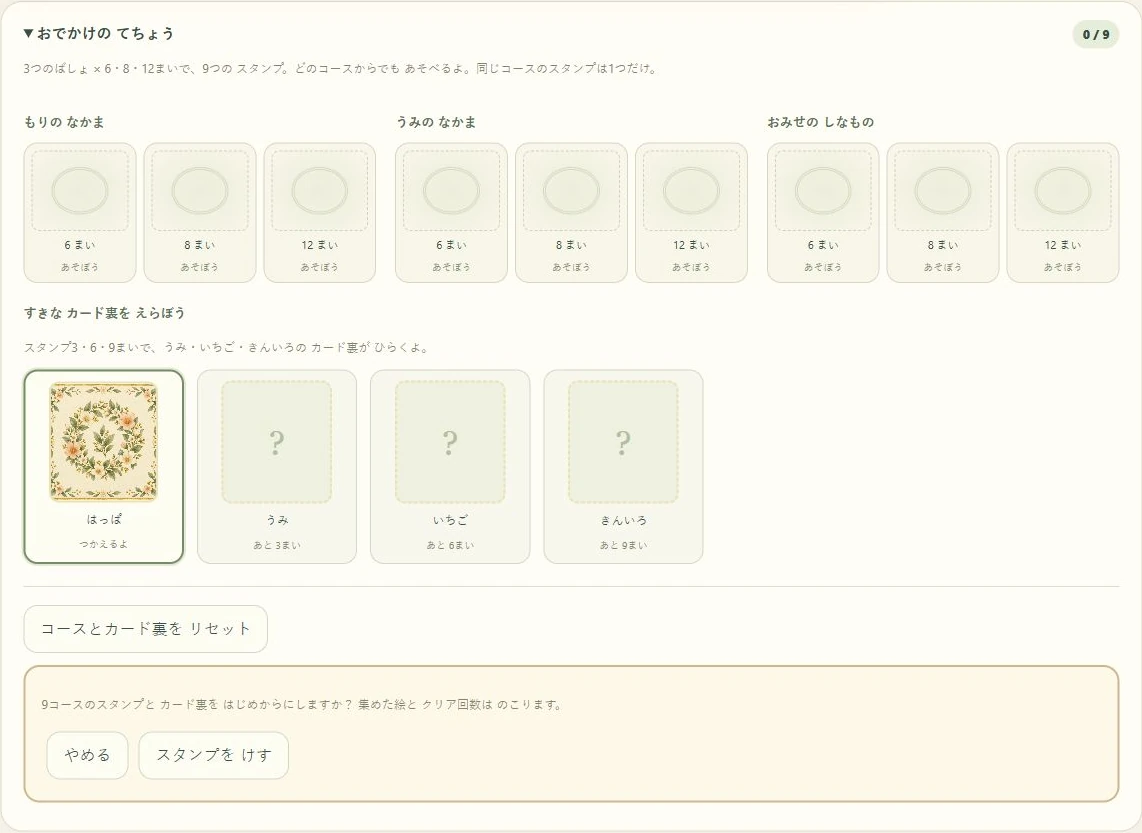
絵を見直したいだけなら「やめる」で戻り、「なかまの えほんずかん」の見つけた絵を押します。図鑑側の「図鑑を リセット」は、逆に絵とクリア回数を消してスタンプとカード裏を残す操作です。もう一度遊ぶために、どちらの記録も消す必要はありません。
間違い探し:同じ場所を順に見る
えほんの まちがいさがしは、6場面で3・5・7個の違いを探せます。まず3個を選び、窓、机、花のように見る範囲を区切ります。左右で違う場所をタッチすると印がつくので、見つけたところとまだ見ていないところを分けられます。
小さい画面ではAとBを切り替えて見られます。違いを覚えにくいなら、保護者が切り替え役になり、子どもが気になる場所を示す役を担当できます。ヒントを使ったあとも、その部分の左右を自分で見比べ直せます。
保護者向け:ティータイムで比べるひとつの例
「え・むずかしさを えらぶ」で「おにわの ティータイム」と3個を選びます。まず動物のぼうしのリボンだけをA・Bで見比べます。「リボンのところ、同じに見える?」と場所を示し、子どもが選んだところをタッチ。正解した部分には枠がつきます。次は別の部分を自分で選び、見つからなければ「ヒント」で光った範囲だけ比べます。左右どちらからでも違いを選べます。
かたちのアトリエ:影から、絵のつながりへ
かたちの アトリエには影合わせと4・6・9・12ピースがあります。影合わせは輪郭を、ピース遊びは絵の端や色の続き方を手がかりにします。4ピースなら、まず絵の角をひとつ探してみましょう。
「葉っぱの緑が続くのはどこ?」「この線の先は?」と、見本とピースを行き来します。ドラッグの代わりに、ピースを押してから置き場所を押す操作も使えます。置く場所を保護者が示し、どのピースかを子どもが選ぶ分担でも遊べます。完成した絵と難しさはアルバムに残ります。
選んだピースの行き先が分からなければ、そのピースを選んでから「ヒントを みる」を押します。金色になった場所へ運ぶか、ピース→場所の順に押します。別の場所に置いても完成済みのピースは消えません。「見本:あり」で全体の絵を確かめてから、同じ4ピースを遊び直せます。
難しさを増やす前の、3つの変え方
- 同じ設定で、別の場面や絵柄に変える。
- 操作は保護者が担当し、探す場所は子どもが決める。
- ヒントを少し短くするか、自分でヒントを出すタイミングを決める。
いくつできたかだけでなく「今回は窓から探したね」「パンの場所に戻れたね」と、選んだ手がかりを話題にできます。枚数やピースを増やすことだけが次の遊び方ではありません。
紙でも、場所と絵をつなぐ
紙に同じ絵を2枚ずつ描き、3組だけ伏せます。うまく描く必要はなく、丸・三角・四角でも構いません。めくる前に「どこにあったかな」と指で場所を選び、答えを見て確かめます。あそびプリントの並び問題も、絵の特徴を見比べる入口として使えます。
記録とやり直しを分ける
新しい問題や「はじめから」は、図鑑・アルバムの削除とは別です。絵合わせでは図鑑と全部そろえた回数を保存しますが、途中のカード配置は保存しません。間違い探しの見つけた印も、このページを開いている間の記録です。「このえを はじめから」は今の場面の印を消し、3・5・7個を変えるとその場面を探し直します。かたちのアルバムは完成した絵と難しさの記録を残し、「この 絵を はじめから」では消えません。記録を消すときは、確認画面を保護者が読んでください。
ここで紹介するのは親子の遊び方です。特定の年齢での達成や学習効果を保証するものではありません。読み方・操作は保護者が手伝い、いつでも遊びを切り上げて構いません。
Puzzles
Finding a pair, noticing a difference and joining a puzzle piece all involve pictures, but each uses a different clue. Here are concrete starting points for three games on this site.
Matching: use a missed pair as your next clue
In Little Picture Pairs, choose 6 cards and Woodland friends, Ocean friends or At the little shop. The peek hint can stay until you hide it, or last eight or three seconds. Begin with a hint that stays, and look at the pairs together before hiding the cards.
- Turn two cards and check whether their pictures match.
- If they differ, remember just one location: “The bread was at the bottom right.”
- When bread appears again, look for that spot. You can check again if you forgot.
Use the manual next-pair setting if you want time to look at a mismatch. In turn-taking mode, turns change after two cards. Try another theme at six cards before increasing the count.
A small goal without changing every setting
The Little journey book has courses with 6, 8 and 12 cards for each of the three picture themes: nine courses in all. Find every pair in one course to earn its stamp. Replaying that course does not add another stamp, so its completed mark can help you choose what to play next. Stamps are not inferred from your earlier completed-game count.
For example, play Woodland friends with 6 cards, then Ocean friends and At the little shop with the same count. Finishing these three courses gives you three stamps and the Sea card back. You start with Leaf; Berry unlocks at 6 stamps and Golden at 9. Choosing a design changes the card backs in the current round too. You can also replay a favourite theme before adding more cards.
Take a closer look at a collected picture
Open Your picture collection and press a picture you have already found to see it larger. Ask “What shape are the rabbit’s ears?” or “How do the bread and apple look different?” You can move from remembering a card’s place to looking at the picture itself. Find an unseen picture’s pair before opening it for a closer look. Press Back to play when you have finished looking.
Know when to hide cards and when to keep records
Step 1: study a different pair before hiding it
This picture shows two different cards turned over in a six-card woodland game, with “Until Next pair” selected. Point to the location of one picture, then press “Next pair”. This turns those two cards face down; it does not shuffle their positions.
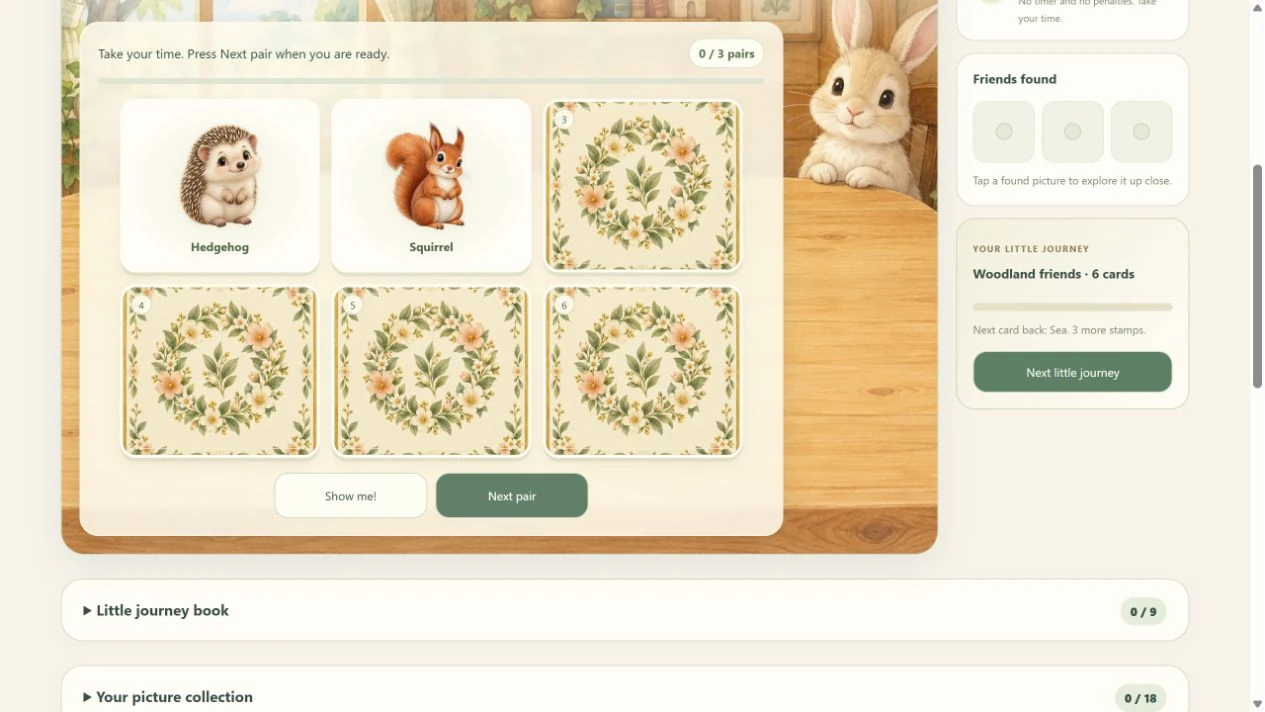
In grown-up settings, “Time to study a different pair” set to “Until Next pair” lets the two pictures stay while you look. Use Next pair rather than “Start again” to keep looking in the same arrangement.
Step 2: read which records a reset will keep
This view opens “Little journey book” and the “Reset journeys & card backs” confirmation. Its nine course stamps are separate from the pictures you collect. The confirmation explains that collected pictures and completed-game counts will stay.
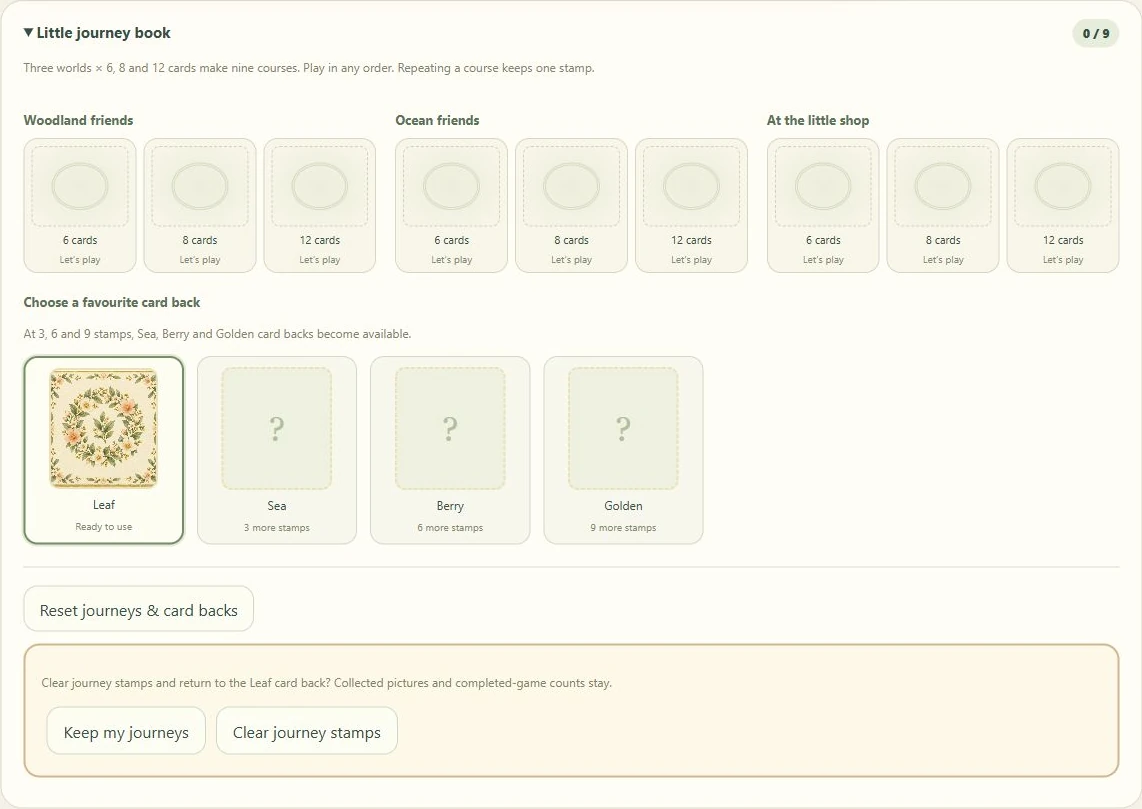
To look at a picture again, choose “Keep my journeys”, then open a discovered picture in “Your picture collection”. Its separate “Reset collection” action clears pictures and completed-game counts while keeping stamps and card backs. You do not need to clear either record to play another round.
Differences: compare one area at a time
Picture Book Puzzles offers six scenes with three, five or seven differences. Begin with three. Look at a window, then a table or flowers. A mark records a correct difference so you can distinguish a searched area from one you have not looked at yet.
On a small screen, switch between pictures A and B. A grown-up can handle switching while the child chooses where to look. After using a hint, compare that detail yourself again.
For grown-ups: one tea-time comparison example
Open Choose a picture and difficulty, then select Garden tea time and 3 differences. Compare only the ribbon on the animal’s hat in A and B. Point to the area and ask “Does the ribbon look the same?” Tap the detail your child chooses; a correct difference gets a frame. Let your child choose another area next. If you need help, use Hint and compare only the highlighted area. You can select a difference in either picture.
Shape Studio: move from outlines to picture clues
Shape Studio offers shadow matching and four-, six-, nine- and twelve-piece puzzles. Shadows use outlines; puzzles use edges and continuing colours. With four pieces, begin by finding one corner.
Compare the example with a piece: “Where does this green leaf continue?” Tap a piece and then its destination if dragging is awkward. Share the task by letting the grown-up point to a destination while the child chooses a piece. Finished pictures and difficulty records stay in the album.
To find the place for a particular piece, select that piece and press Show a hint. Drag it to the golden place, or tap the piece and then that place. Choosing a wrong place does not remove pieces already fitted. Use Model: shown to compare with the whole picture, then replay the same four-piece puzzle.
Three changes before adding more pieces
- Keep the setting and choose another picture.
- Let the grown-up move while the child decides where to search.
- Shorten a hint or let the child choose when to request it.
Talk about a clue they chose: “You began at the window” or “You went back to the bread”. Increasing the count is not the only way to continue.
Connect places and pictures on paper
Draw three pairs on paper and place them face down. Circles, triangles and squares are enough. Point to a spot before turning a card, then check. The pattern page in our play pack is another way to compare picture features.
Separate a new round from clearing records
Starting again does not necessarily clear a collection or album. Picture Pairs saves its collection and completed-game count, but not an unfinished card layout. Found differences are kept only while the page is open. Restart this picture clears the current scene’s marks; changing between 3, 5 and 7 differences starts that scene again. Shape Studio saves completed-picture and difficulty records, which Restart this picture keeps. A grown-up should check the confirmation before deleting records.
These are suggestions for shared play, not promises about learning outcomes. A grown-up can handle reading or controls, and you can stop whenever you wish.