そだてる
りんごを運んで、切って、混ぜたら、だれに「どうぞ」する? こぐまの キッチンでは、材料から盛りつけまでの変化を見ながら、森のお客さんへひと皿を作れます。ここでは最初に選べるフルーツボウルを、ドラッグが難しいときのボタン操作も含めて紹介します。画面の料理ごっこであり、実際の料理の材料や調理手順を示すものではありません。
まずは「おてつだい」で、ひと皿だけ
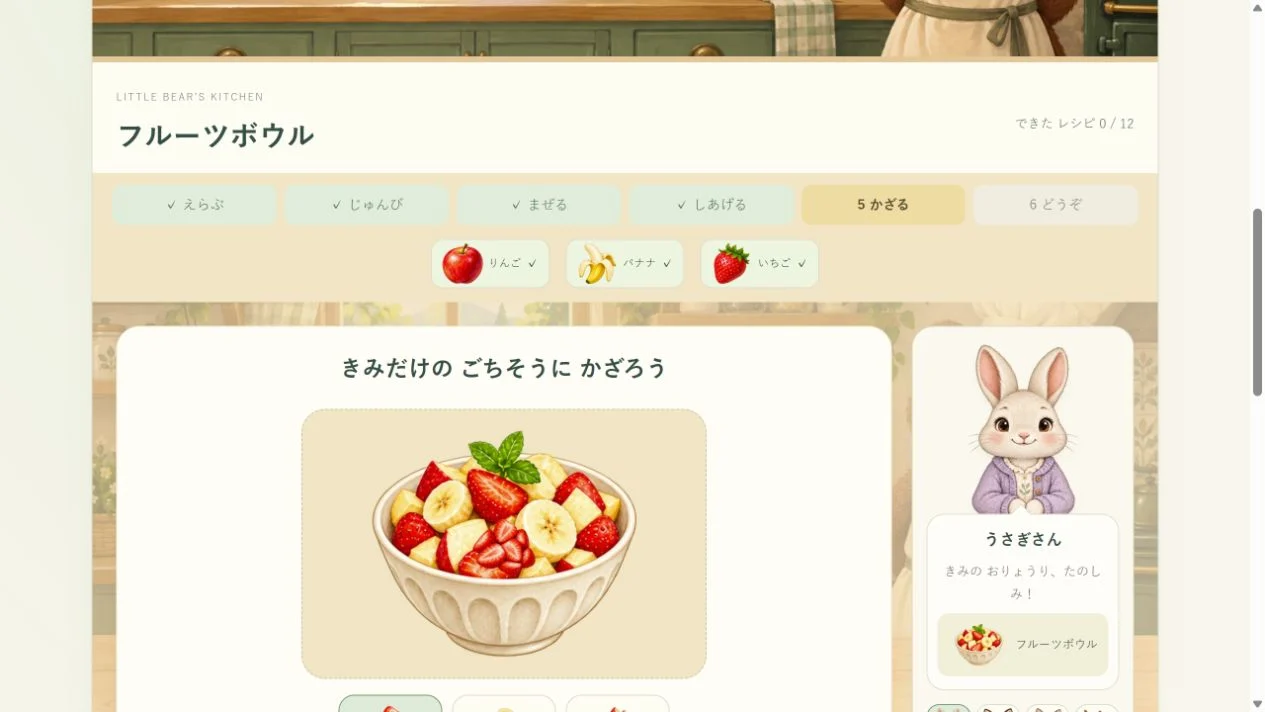
画面上の「おてつだい」を選び、「おりょうりを えらぶ」から「フルーツボウル」を選びます。最初からこの料理が表示されていれば、そのまま始められます。お客さんの絵からうさぎさんを選んでみましょう。材料の絵は、りんご・バナナ・いちごの3つです。
音を使いたいときは「おとを ためす」を押せます。音が出なくても、絵・工程の表示・進み具合を見て遊べます。時間制限はないので、保護者がボタンを読んで、子どもが材料や飾りを選ぶ分担でも構いません。
フルーツボウルを作る、6つの工程
- 材料をトレーへ運ぶ。 棚のりんごを押してから、「ここに はこんでね」と書かれたトレーを押します。バナナ、いちごも同じように運びます。棚からトレーへ直接ドラッグすることもできます。材料を押しただけではトレーに入らないので、押す操作なら「材料、トレー」の2回を組にします。
- 果物をひとつずつ切る。 まな板に出た果物の線をなぞります。「おてつだい」では各果物に切る線が1つ。「ひとつ きる」を1回押す方法でも進められます。りんご、バナナ、いちごの準備が終わると、混ぜる画面になります。
- 混ざり具合を見る。 ボウルの内側を、中心から少し離れたところで丸くなぞります。「ひとまぜ する」を使うなら、まだ混ぜていない状態から5回押すと100%になり、次の工程へ進みます。途中で指を離し、「今、どのくらい混ざった?」と数字や絵を見ても構いません。
- 器へ移す。 「おさらに うつそう」を押します。フルーツボウルでは、加熱やひっくり返しの操作はありません。次は好きな飾りを選べます。
- 好きなところへ飾る。 いちご・バナナ・りんごの飾りを選び、皿の内側を押すか、飾りをドラッグします。狙った場所へ置きにくければ「まんなかに のせる」を使えます。飾りは6個まで。「ひとつ もどす」で最後の1個を取り除けます。飾りをつけずに完成させても大丈夫です。
- お客さんに「どうぞ」。 「おきゃくさまに どうぞ!」を押します。皿をお客さんのところへドラッグする方法でも渡せます。完成すると、その料理を作った回数と、今回の飾りつけがごちそうブックに残ります。保存できない表示が出たときは、後で記録が残るとは限りません。
難しさを変えると、何が変わる?
- おてつだい: 次に運ぶ材料が示され、果物などの切る線は1つです。最初の操作を確かめたいときに使えます。
- じぶんで: 必要な材料は同じですが、次の材料の案内はなくなり、切る線は3つになります。3つの別々の線を切ります。
- じゅんばん: レシピに並んだ材料を左から順に運びます。フルーツボウルなら、りんご、バナナ、いちごの順です。切る線も3つになります。
難易度を切り替えると、今の料理は材料選びからやり直しになります。完成済みのごちそうブックは残ります。「今日は案内を減らす? それとも同じ設定で別の飾りにする?」と、始める前に選ぶと途中のひと皿を手放さずに済みます。
4人のお客さんと、12種類の料理
お客さんは、うさぎさん・きつねさん・ねこさん・りすさんの4人です。お客さんの絵を押すだけなら、作りかけの料理を保ったまま相手を変えられます。「おきゃくさまの おねがい」は、その相手の料理を選び直して材料選びへ戻る操作です。注文から作りたいときは、調理を始める前に使いましょう。選んだお客さんには、お願いされたもの以外の完成した料理も渡せます。
料理は、フルーツボウル、にんじんスープ、フルーツトースト、パンケーキ、いちごスムージー、フレンチトースト、りんごの タルト、いちごミルクプリン、バナナブレッド、いちごの ケーキ、にんじんマフィン、ふわふわ オムレツの12種類。料理によって、注ぐ・卵を割る・加熱する・ひっくり返す・重ねるなど、画面の操作が変わります。長押しの工程は指を離すと止まり、ボタンを短く押して進める方法もあります。
完成後の「もういちど つくる」は同じ料理を最初から。「つぎの おねがい」は次のお客さんへ交代して、その相手の料理を選びます。12種類を続けて完成させる必要はなく、気に入った料理をもう一度作っても楽しめます。
ごちそうブックで、前の飾りと見比べる
「ごちそうブック」では12種類の料理、作った回数、最後に渡した相手と飾りつけを確認できます。同じ料理を作り直すと、その料理の写真は最新の盛りつけに変わります。過去の飾りがすべて別々に並ぶアルバムではありません。「これを つくる」を押すと、その料理を材料選びから始めます。
完成した料理の種類が2つになると「みどりの クロス」、5つで「お花の クロス」、9つで「ほしの クロス」が選べます。最初の「木のテーブル」も使えます。同じフルーツボウルを何回作っても、料理の種類は1つのままです。使えるようになったクロスは、ブックで選んでから料理の画面へ戻ると見られます。
止まってしまったときは、今の工程を確認
- 材料が入らない: レシピの絵にある材料かを見ます。押して選んだだけなら、次にトレーを押します。「じゅんばん」では、まだ運んでいない一番左の材料からです。
- 切るところが進まない: チェック済みの線ではなく、まだ印のない線を選びます。「ひとつ きる」なら、残っている線を順に切れます。
- 混ざり具合が増えない: ボウルの中心だけでなく、その周りを丸くなぞります。指の動きを保護者が助ける前に、「ひとまぜ する」を試しても構いません。
- 飾りが置けない: 皿の中央寄りへ置くか「まんなかに のせる」を使います。6個あるときは「ひとつ もどす」で場所を空けます。
- 皿を渡せない: 飾りつけの工程まで進んでいるかを見て、「おきゃくさまに どうぞ!」を押します。ドラッグを失敗しただけなら、料理を作り直す必要はありません。
いったん止める・やり直す・記録を消す
専用の一時停止ボタンはありません。長押しは指を離すと進行が止まります。ドラッグをやめたいときは、トレーや皿、お客さんの外へ放すと、その移動は反映されません。別のタブやウィンドウへ移ったときも、押し続ける操作は中断されます。ページを開いたままなら今の料理へ戻れますが、ページを閉じたり読み込み直したりすると、未完成の料理は最初からになります。
上部の「この おりょうりを やりなおす」は、今の材料・調理・飾りを消して同じ料理をやり直す操作です。完成済みの料理やテーブルの記録は消しません。ブック内の「おとなのかたへ・きろくのリセット」から「レシピブックを リセット」を選ぶと、確認画面が出ます。「きろくを けす」は料理の回数、保存した盛りつけ、お客さん、テーブルの記録をすべて消し、今の料理も最初に戻します。やめたいときは「やめる」です。
完成済みの記録は、このブラウザに保存します。別の端末やブラウザには引き継がれません。「ほぞんできません」と表示されたときも遊べますが、閉じた後の記録は残らないことがあります。保存のサポートも参考にしてください。
画面を離れたら、紙のフルーツ屋さん
紙にりんご・バナナ・いちごを描き、手で小さくちぎって、空の器や紙皿へ並べます。ひとりが「料理する人」、もうひとりが「お客さん」になり、「りんごをひとつ、いちごをふたつ」のように注文してみましょう。ゲームと同じ飾りを作っても、紙だけの新しい盛りつけにしても構いません。最後は「どの飾りが気に入った?」と見せ合って、ひと皿でおしまいにできます。
ここで紹介するのは親子の遊び方です。特定の年齢での達成や学習効果を保証するものではありません。読み方・操作は保護者が手伝い、いつでも遊びを切り上げて構いません。
Care & Grow
Carry an apple, cut it, stir the fruit, then choose who to serve. In Little Bear’s Kitchen, a dish changes from ingredients into a decorated meal for a woodland guest. This guide follows the Fruit bowl, including button alternatives when dragging is awkward. It is pretend cooking on screen, not a real recipe or cooking procedure.
Begin with Guided and just one dish
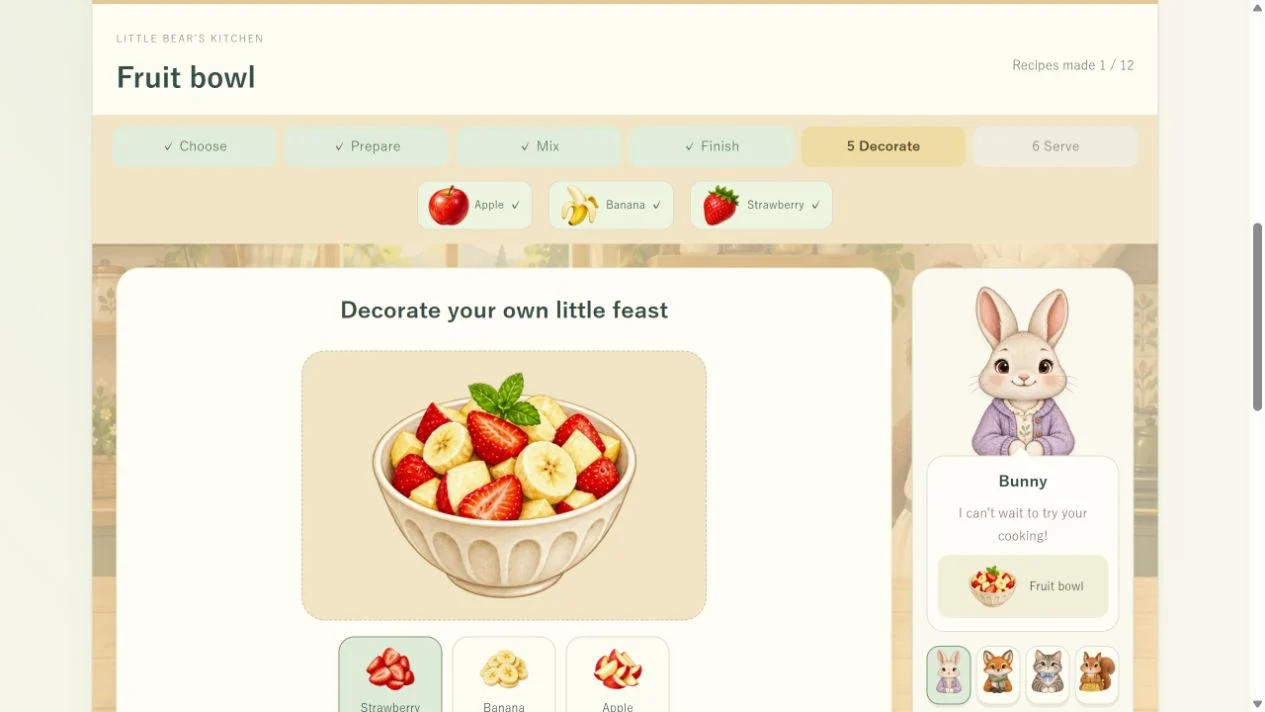
Choose “Guided” at the top, open “Choose a recipe” and select “Fruit bowl”. If that recipe is already on screen, you can begin there. Choose Bunny from the guest portraits. The recipe strip shows three ingredients: Apple, Banana and Strawberry.
Press “Try the sound” if you want sound effects. Pictures, step labels and progress displays also let you play without sound. There is no time limit. A grown-up can read the buttons while the child chooses ingredients or decorations.
Make a Fruit bowl in six steps
- Carry the ingredients to the tray. Tap Apple on the shelf, then the tray labelled “Bring ingredients here”. Repeat with Banana and Strawberry. You can also drag each ingredient straight to the tray. Tapping an ingredient alone selects it; the tap alternative is a pair of actions: ingredient, then tray.
- Cut each fruit. Swipe along or across the line on the fruit. In Guided, each fruit has one cutting line. Pressing “Make one cut” once is another way to prepare it. Prepare Apple, Banana and Strawberry to reach the stirring step.
- Watch the mixing progress. Draw circles inside the bowl, a little away from its centre. Alternatively, press “Give it a stir” five times from an unmixed bowl to reach 100% and continue. You can lift your finger partway through and ask, “How much has mixed so far?” while looking at the progress.
- Transfer the fruit. Press “Bring it to the bowl”. This recipe has no heating or flipping step. The next screen lets you choose decorations.
- Decorate your dish. Choose a Strawberry, Banana or Apple topping, then tap inside the plate, or drag a topping onto it. “Add to the centre” is an alternative if placing it is difficult. You can add up to six toppings. “Undo topping” removes the last one. Serving without any topping is also allowed.
- Serve your guest. Press “Serve to your guest!” or drag the plate to the guest. Completing the dish updates its made count and keeps this decoration in the cookbook. If a saving warning appears, the record may not remain after you close the page.
What changes with the difficulty?
- Guided: the next ingredient is highlighted, and fruit has one cutting line. Use it to try the controls for the first time.
- Independent: the required ingredients stay the same, but the next ingredient is not highlighted. Fruit has three separate cutting lines to complete.
- Recipe order: carry ingredients in the recipe strip’s left-to-right order. For the Fruit bowl, that is Apple, Banana, then Strawberry. Fruit also has three cutting lines.
Changing difficulty restarts the current dish at ingredient selection. Completed cookbook records remain. Choose the setting before cooking: “Would you like fewer clues, or the same setting with a new decoration?”
Four guests and twelve recipes
The guests are Bunny, Fox, Cat and Squirrel. Tapping a guest portrait changes the recipient while keeping your current dish. “A guest’s request” selects a recipe for that guest and restarts ingredient selection, so use it before cooking when you want to follow an order. You can also serve a guest a finished dish other than their requested recipe.
The twelve recipes are Fruit bowl, Carrot soup, Fruit toast, Pancakes, Berry smoothie, French toast, Apple tart, Berry milk pudding, Banana bread, Strawberry cake, Carrot muffins and Fluffy omelette. Different recipes use actions such as pouring, cracking an egg, heating, flipping or stacking. On a holding step, releasing stops the action; short button taps also let you progress.
After serving, “Make it again” restarts the same recipe. “Next request” moves to the next guest and chooses that guest’s recipe. You do not need to complete all twelve in one sitting. Making a favourite dish again is another way to play.
Look back in your cookbook
“My cookbook” shows the twelve recipes, their made counts and the guest and decorations from the last serving of each recipe. Making the same recipe again replaces its pictured decoration with the newest one; it does not keep a separate album of every version. “Make this” begins that recipe from ingredient selection.
Complete two different recipes to unlock Sage cloth, five for Flower cloth and nine for Star cloth. Wooden table is available from the start. Repeating the Fruit bowl adds to its made count but still counts as one recipe type. Choose an available cloth in the cookbook, then return to cooking to see it.
If a step seems stuck
- An ingredient will not go in: check that its picture is in the recipe strip. If you only selected it, tap the tray next. In Recipe order, use the leftmost ingredient that has not been carried yet.
- Cutting does not continue: choose a line without a completed check mark. “Make one cut” completes the next remaining line.
- Mixing progress stays still: circle around the centre rather than moving only in the middle. Try “Give it a stir” before taking over the child’s hand movement.
- A topping will not stay: place it near the middle of the plate or use “Add to the centre”. With six toppings already placed, use “Undo topping” to make room.
- The plate will not reach the guest: check that you have reached the decorating step, then press “Serve to your guest!” A missed drag does not mean you need to cook the dish again.
Stopping, restarting and clearing records
There is no separate pause button. Release a hold to stop its progress. To abandon a drag, release outside its tray, plate or guest target; that move will not be applied. Moving to another tab or window also cancels an active hold. You can return to the current dish while the page stays open, but closing or reloading the page restarts an unfinished dish.
“Restart this recipe” at the top discards the current ingredients, cooking and decoration, then restarts the same dish. It keeps completed cookbook and table records. Inside the cookbook, open “For grown-ups & reset” and choose “Reset the recipe book” for a confirmation. “Clear records” removes recipe counts, saved decorations, guest and table records, and also restarts the current dish. Choose “Cancel” to leave them alone.
Completed records are kept in this browser. They do not transfer to another browser or device. You can keep playing if “Saving is unavailable” appears, but records may not remain after closing the page. See our saving help for further checks.
Continue with a paper fruit café
Draw apples, bananas and strawberries on paper, tear them into small pieces and arrange them in an empty bowl or on a paper plate. One person cooks and the other is a guest: “One apple and two strawberries, please.” Recreate the screen decoration or invent a new paper dish. Finish by showing each other a favourite decoration; one dish can be enough for today.
These are suggestions for shared play, not promises about learning outcomes. A grown-up can handle reading or controls, and you can stop whenever you wish.